Overview
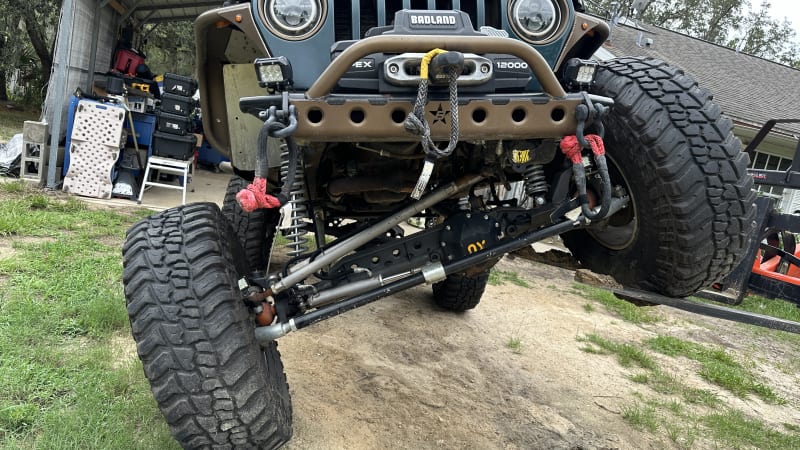
Installation of the Barnes 4X4 Pritchett Canyon Front Bumper (Welders Kit) on the TJ, including the Harbor Freight APEX 12K Synthetic Winch with wireless remote. High-clearance design for better approach angle and serious protection on the trail.
Tools Needed
- • 1/2" drive socket set & ratchet
- • Torque wrench (ft-lbs)
- • Pry bars / trim removal tools
- • Drill + bits (for light mounts)
- • Jack & stands
- • Wire strippers & crimpers (for winch wiring)
Materials Used
- • Barnes 4X4 Pritchett Canyon Front Bumper Welders Kit (TJ/LJ)
- • Harbor Freight APEX 12K Synthetic Winch with Wireless Remote
- • Baja Designs LED Light Mounts
- • Hardware kit (bolts, nuts, washers)
Estimated Time
Approximately 4-6 hours (including winch wiring and testing).
Installation Steps
Remove Old Bumper & Winch
Jack up the front, support the frame, disconnect the old bumper and winch wiring. Remove bolts and set aside hardware.
Prep the Frame & Mounts
Clean mounting points, inspect for rust, and drill any additional holes needed for the welders kit and light mounts.
Install Barnes 4X4 Pritchett Canyon Bumper
Position the welders kit bumper, hand-tighten bolts, then torque to spec. Integrate the winch cradle during install.
Mount the Harbor Freight APEX 12K Winch
Bolt the winch into the bumper cradle, route the synthetic rope through the hawse fairlead, and mount the wireless remote receiver.
Wire Lights, Remote & Test
Install Baja Designs LED mounts and lights, wire the winch remote and lights to the battery, then test all functions and torque everything again.
Results
The front is now protected with the high-clearance Pritchett Canyon bumper and equipped with a reliable APEX 12K winch for serious trail use.




Look for the front bumper card in the Repairs & Mods grid or the CLICK TO INSPECT buttons.